How do I send a secure file from the Secure Exchanges online portal?
To send a secure email from the online portal, you must log in to your account and click on the "Send a secure message" button after
You will see the following interface:
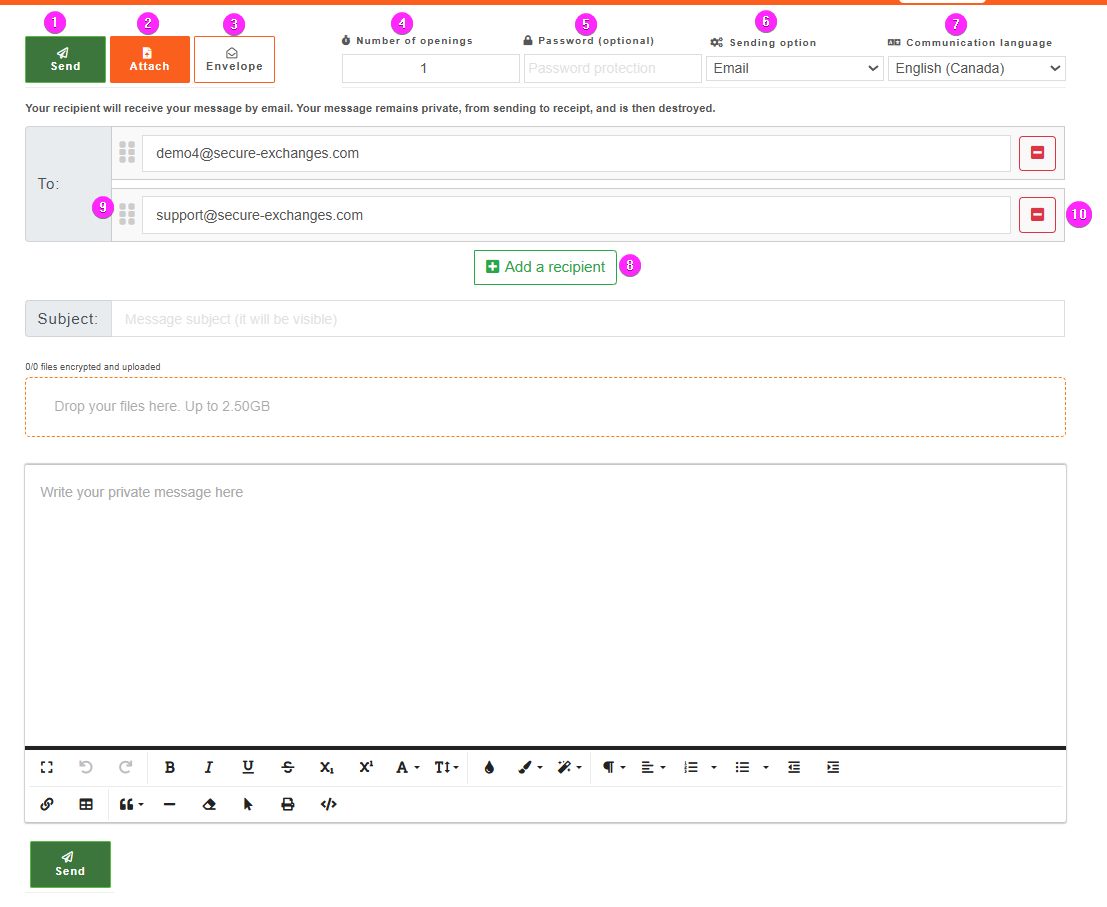
This interface allows you to:
1. Send the secure email when you have written it and attached the necessary attachments if so.
2. Attach the attachments by clicking on this button or by dragging them to the corresponding area
3. Send an envelope from the online portal
4. Define the opening number of your secure email
5. Secure your email with a password
6. Choose to send an email or an SMS to your recipient and also choose if you want to secure them
7. Choose the communication language of your secure email
2. Attach the attachments by clicking on this button or by dragging them to the corresponding area
3. Send an envelope from the online portal
4. Define the opening number of your secure email
5. Secure your email with a password
6. Choose to send an email or an SMS to your recipient and also choose if you want to secure them
7. Choose the communication language of your secure email
What's new :
8. Add a recipient to your e-mail: This button has been redefined for a better user experience.
9. Change recipient order: You can now change the order of recipients, which is particularly useful for multiple signatures.
10. Remove a recipient: You can easily remove a recipient if necessary.
Related Articles
Understanding Security Levels in Secure Exchanges
At Secure Exchanges, security is at the core of our solution. To help you choose the right level of protection based on the sensitivity of the information you're transmitting, we’ve created a detailed document that outlines the different security ...How to send a file on Gmail without going through Secure Exchanges?
To be able to send a file to Gmail without securing it, you simply have to disable Secure Exchanges for the email you are writing. When Secure Exchanges is disabled, you will see the button appear like this: You can then download your files and send ...What options are available on the Secure Exchanges pop-up window on Outlook?
When Secure Exchanges is enabled on Outlook and once you click on the send button for a new email; the following window will appear on your screen: This window allows you to define your security options before sending your email. 1. The entire ...What account management options are available from the online portal?
The list of options available through the option to manage your own account are as follows: 1 - You can send a secure email from the online portal by clicking on this button. 2 - By clicking on this button, you can track your signatures. 3 - Edit ...New feature: Microsoft authentication with the Secure Exchanges Online Portal
Secure Exchanges enables a simplified and secure login process with Microsoft Authentication, ideal for Office 365 users or organizations using Microsoft Azure Active Directory. Here’s how to use this authentication method to access the Secure ...